UFITProduct Hub

Aprendiz Inteligente · AI Tutor

A front-row seat for every student.

Aprendiz Inteligente gives each student a 1:1 AI tutor — an interactive AI learning board and automatically generated, curriculum-aligned quizzes. It is in use with Brazilian public schools, and it is built so that every student can take part, including students with disabilities.

The AI learning board

Every topic becomes an interactive lesson.

The AI board turns a curriculum topic into a guided lesson — concept text with linked key terms, comparison tables, a glossary, and built-in questions. Content is drawn only from approved materials (RAG), so it stays on-curriculum.

AI learning board for the lesson Relações Ecológicas I: concept text, glossary tab, and a biotic/abiotic comparison table, in Portuguese.
AI board · live product screen

Lesson “Relações Ecológicas I” — tabs for objective, concept and glossary; a comparison table; adjustable text size.

Concept, glossary & tables

Explanations with tappable key terms, structured comparison tables, and a per-lesson glossary.

Curriculum-locked (RAG)

Answers only from approved textbooks and verified materials; if it isn’t in the curriculum, the AI says so and points to the source.

Built-in questions

Check-for-understanding items sit right inside the board, with concrete feedback.

Who sees what

One lesson, two doors — the teacher’s desk and the student’s planet.

Aprendiz is not a single screen shared by everyone. Teachers and students sign in through separate doors and land in two deliberately different products that share the same curriculum unit, the same lesson content and the same record of what each student has learned.

Every screen below is a capture of the running build on the Paraná staging environment, using a test class (“Testing Class 1”, “Dot Student 1”). No real student data is shown; interface language is set per user, so some captures are in Portuguese and some in English.

Teacher view

Everything the unit needs, already assembled.

The teacher signs in to the planning side of the platform. It is a working desk — classes, the approved curriculum library, the AI board and the analysis of every quiz the class has taken. Nothing here is gamified, and students never see it.

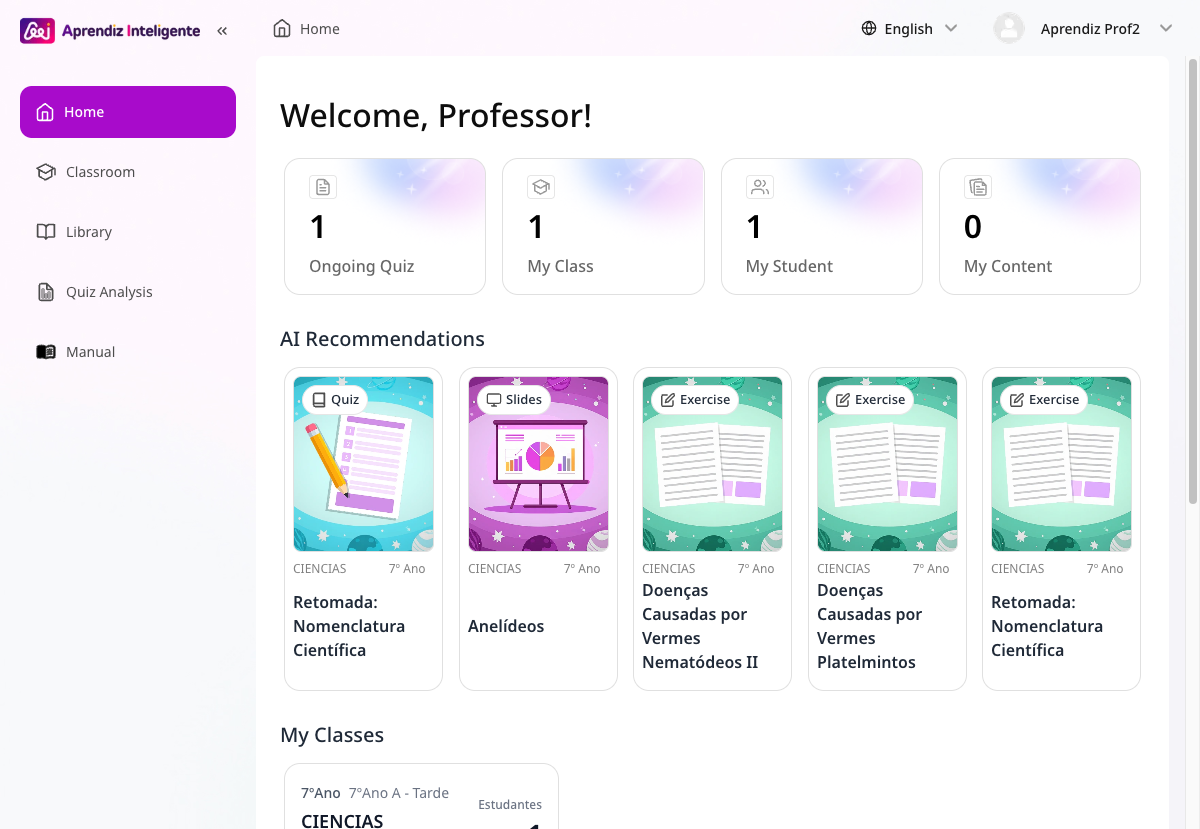
Aprendiz Inteligente teacher home: sidebar with Home, Classroom, Library, Quiz Analysis and Manual; counters for Ongoing Quiz, My Class, My Student and My Content; AI Recommendations cards for quiz, slides and exercises; My Classes list.
1 · Teacher home

“Welcome, Professor!” — what is running now, plus AI recommendations for the units this class is on.

  1. The teacher door. Sign in at /regular/…/login with the school account or Google. The student door is a different address entirely.
  2. Home answers “what is live right now” — Ongoing Quiz, My Class, My Student, My Content — and proposes ready material (quiz, slides, exercises) for the units the class has reached.
  3. Library = the approved curriculum, unit by unit. Filtered to the teacher’s grade, subject and semester (here: 7th-grade science, 2nd semester → 33 units). Search by topic, no hunting across drives.
  4. Open a unit and the four teaching assets are already built — AI Board, Quiz, Slides, Exercise. “New Quiz” generates a custom one when the standard set isn’t the right fit.
  5. Quiz Analysis closes the loop — per-class reports for each quiz the class has answered, plus a per-student activity trail.
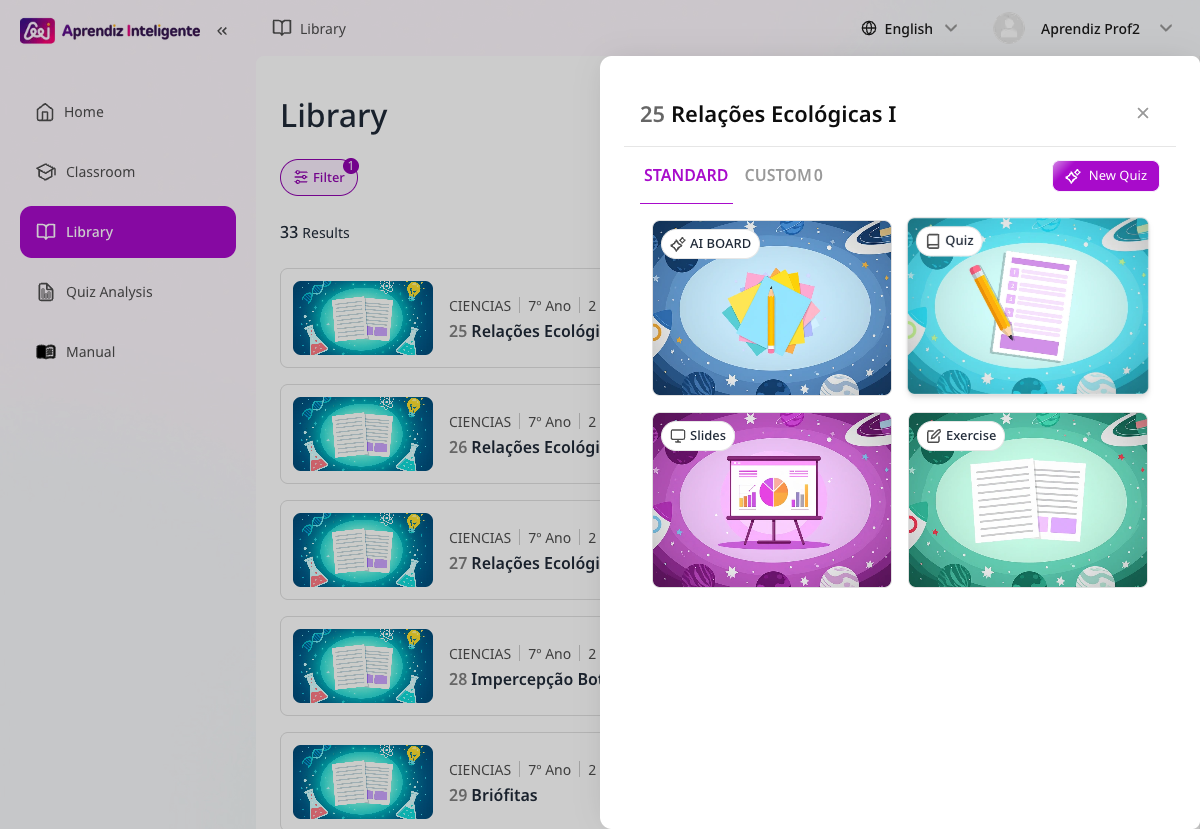
Library unit panel for “25 Relações Ecológicas I” showing four ready assets: AI BOARD, Quiz, Slides and Exercise, with a New Quiz button and Standard / Custom tabs.
2 · One unit, four ready assets

Board, quiz, slides and exercise sheet arrive together with the unit — the teacher chooses, not builds.

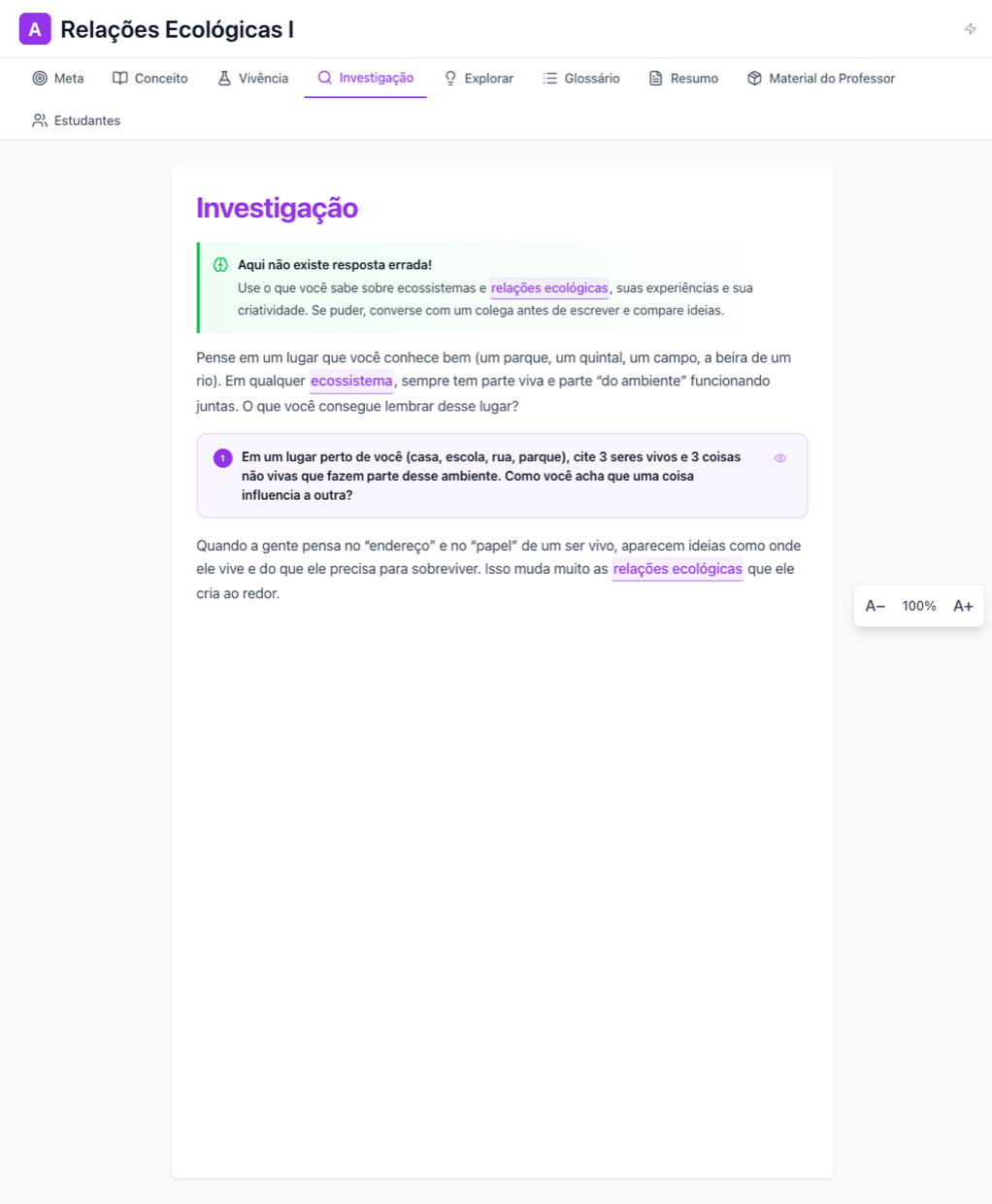
AI board tab bar: Meta, Conceito, Vivência, Investigação, Explorar, Glossário, Resumo, Material do Professor and Estudantes; the Investigação tab shows an open-ended prompt for students.
3 · The board runs the lesson in order

Objective → concept → hands-on → investigation → explore → glossary → summary, with teacher material attached. The Estudantes tab — teacher-only — lists every student’s written answer.

  • Preparation load dropsThe unit arrives assembled and calendar-aligned; the teacher edits rather than authors.
  • The plan holds in classThe board’s tab order is the lesson order, so a period runs to a structure instead of improvising.
  • One place, not fiveText, glossary, video, experiment, quiz and teacher notes sit inside the same unit.
Student view

A planet per subject, a mission per unit.

The student never sees the teacher’s desk. The student door opens on a class world: an avatar, a semester, one planet per subject and a path of units to clear. The curriculum content behind it is identical — the surface is built to be answered, not administered.

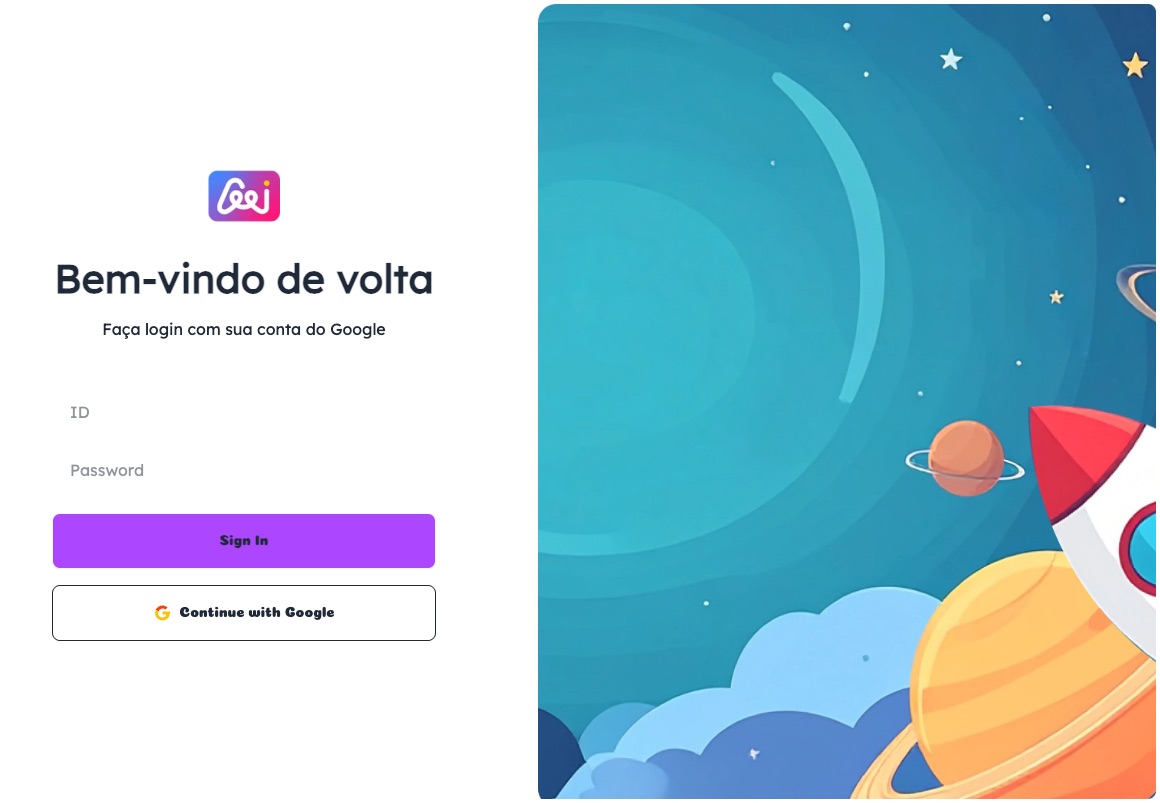
Student sign-in screen: “Bem-vindo de volta”, ID and password fields, a Sign In button and Continue with Google, next to space-themed artwork.
1 · The student door

/aluno/…/login — school ID and password, or Google. Same platform, separate entrance.

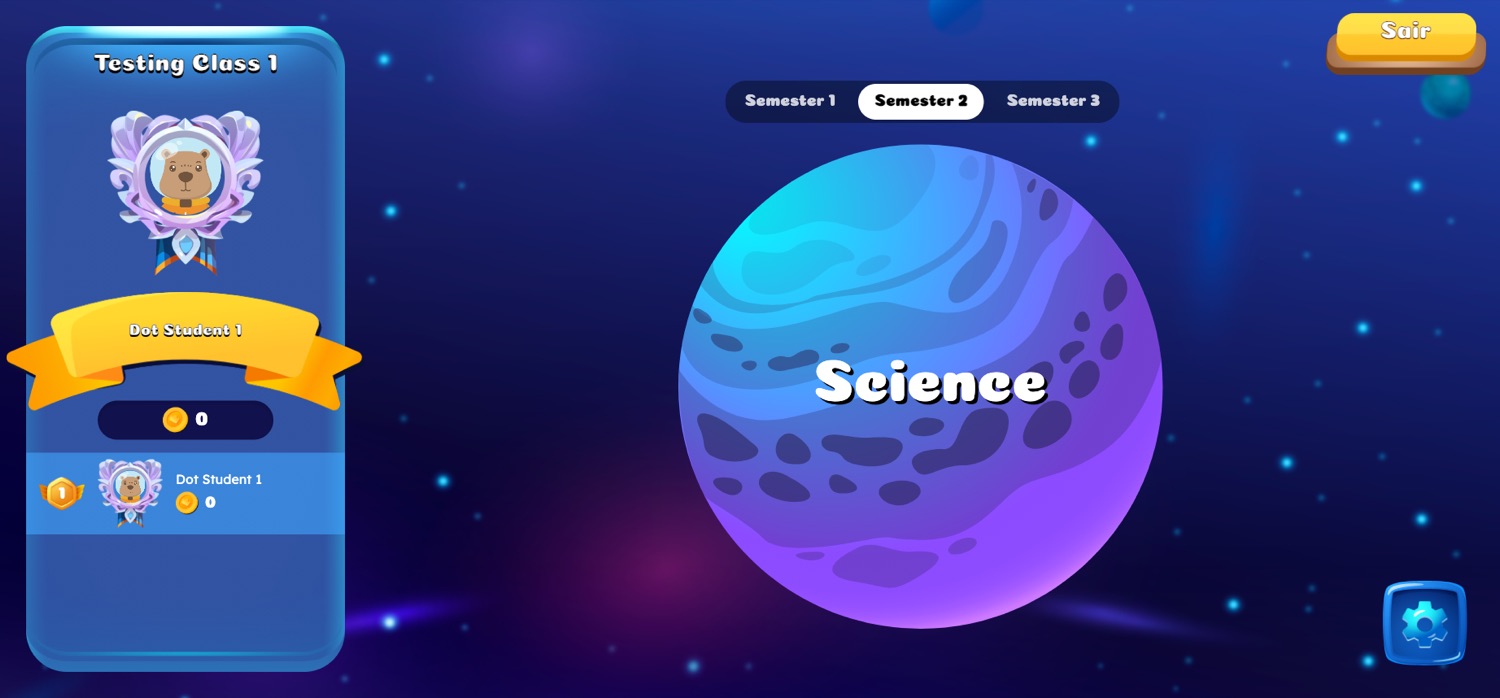
  1. Sign in and land in the class world — class name, avatar, coins earned, the live class ranking and the three semesters of the school year.
  2. Pick a subject planet (Science) to open its unit path.
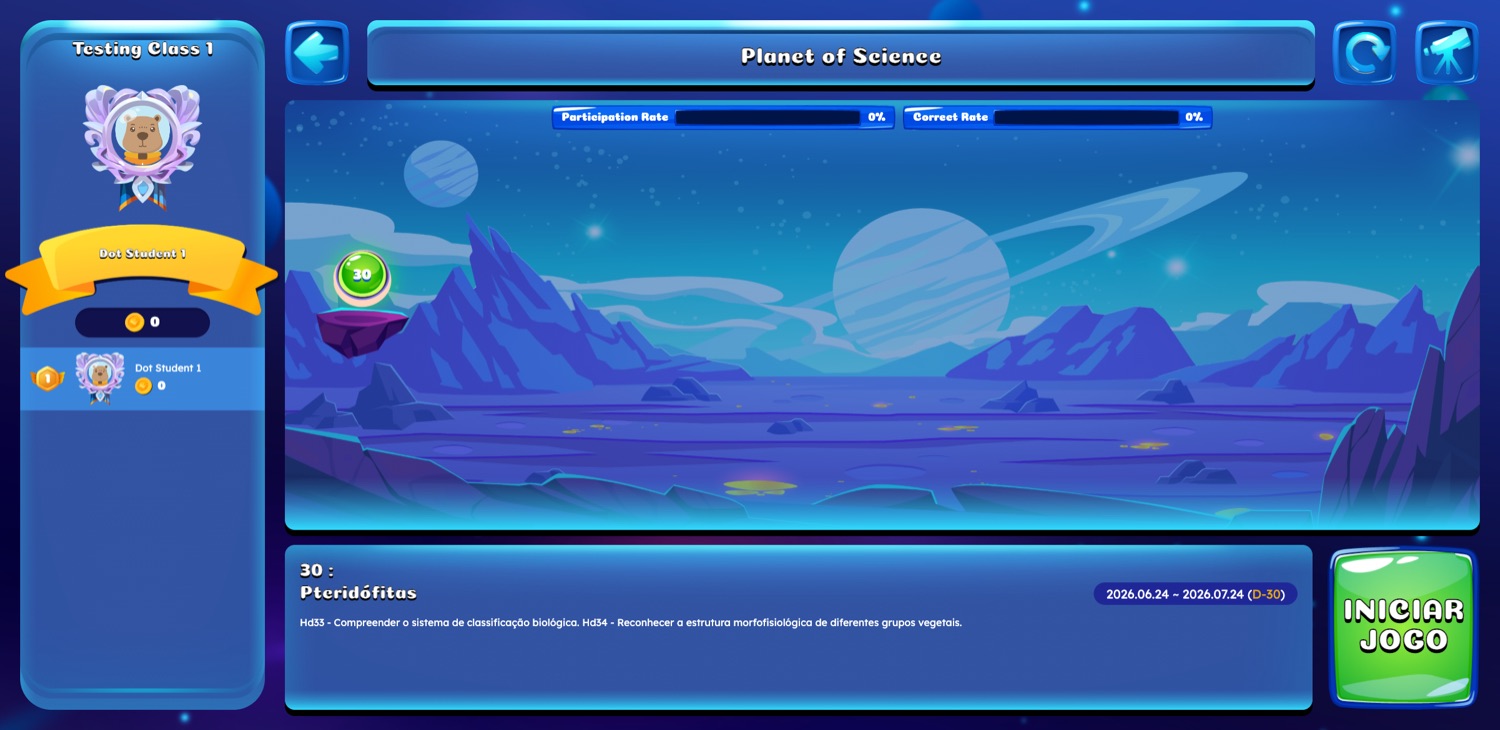
  3. Each unit shows the student their own numbers — participation rate and correct rate — plus the skills it covers (curriculum codes such as Hd33 / Hd34) and the window the unit is open (e.g. 24 Jun → 24 Jul, D-30).
  4. “Iniciar jogo” is teacher-gated. The quiz round is synchronous: it starts when the teacher opens it and the whole class answers together, so the game is part of the lesson, not a substitute for it.
  5. Writing happens on the same board the teacher projects. In Investigação — “here there is no wrong answer” — the student types an answer, sends it, and receives AI feedback with a level (Ótimo / Bom / Regular / Insuficiente). The teacher sees each answer in the Estudantes tab.
Student game home: class card with avatar, name, coins and class ranking on the left; Semester 1/2/3 tabs; a large planet labelled Science in the centre.
2 · The class world

Avatar, coins, ranking, semester — and one planet per subject.

Planet of Science screen: participation rate and correct rate bars, a unit marker numbered 30 on the path, unit title Pteridófitas with skill codes Hd33 and Hd34, the open window 2026.06.24–2026.07.24 (D-30) and an INICIAR JOGO button.
3 · The unit path

Unit 30 “Pteridófitas”, the skills it covers, the window it is open, and the student’s own participation and correct rates.

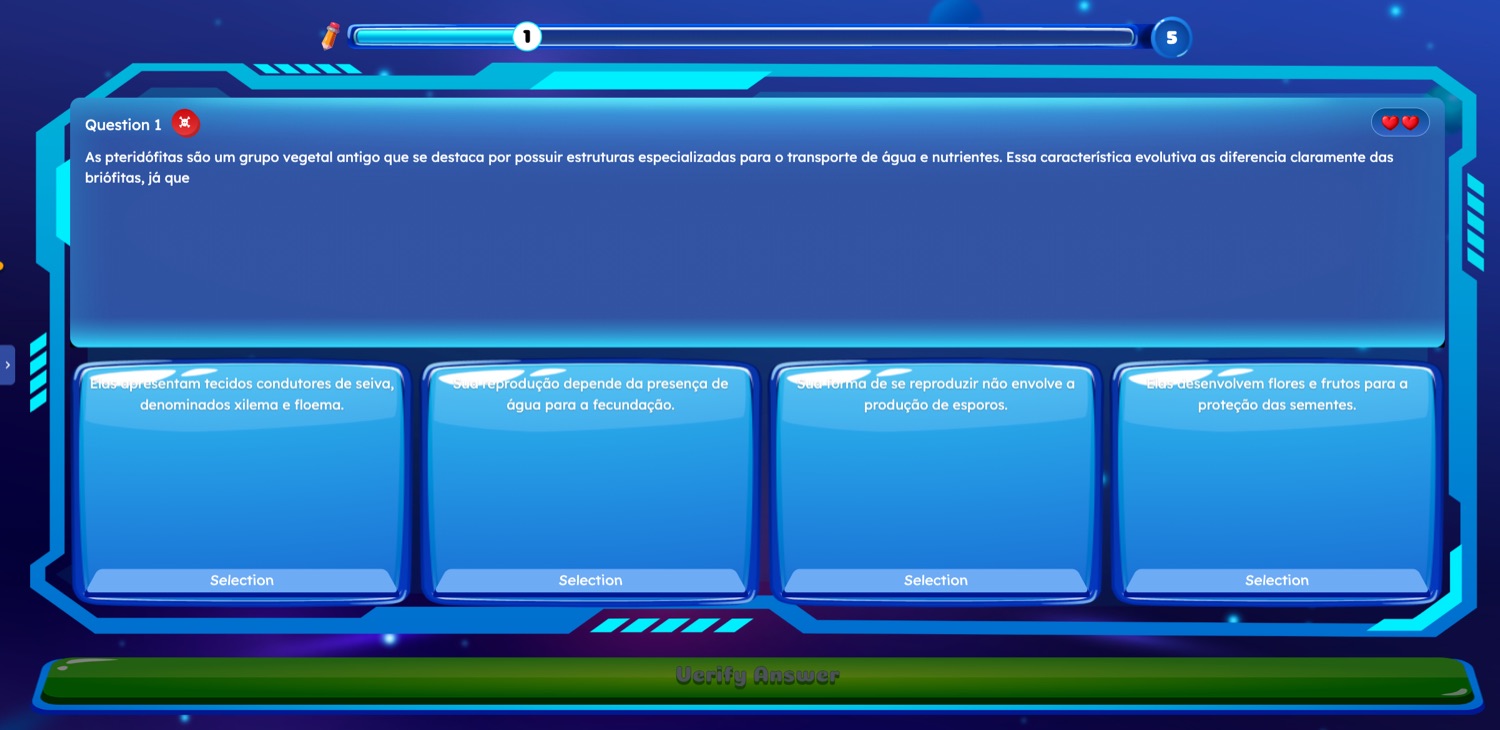
Live quiz question 1 of 5 in Portuguese about pteridophytes, with four answer cards, two remaining lives and a Verify Answer button.
4 · Answering, live with the class

Question 1 of 5, remaining lives, four options — the same curriculum-aligned items the teacher reviewed.

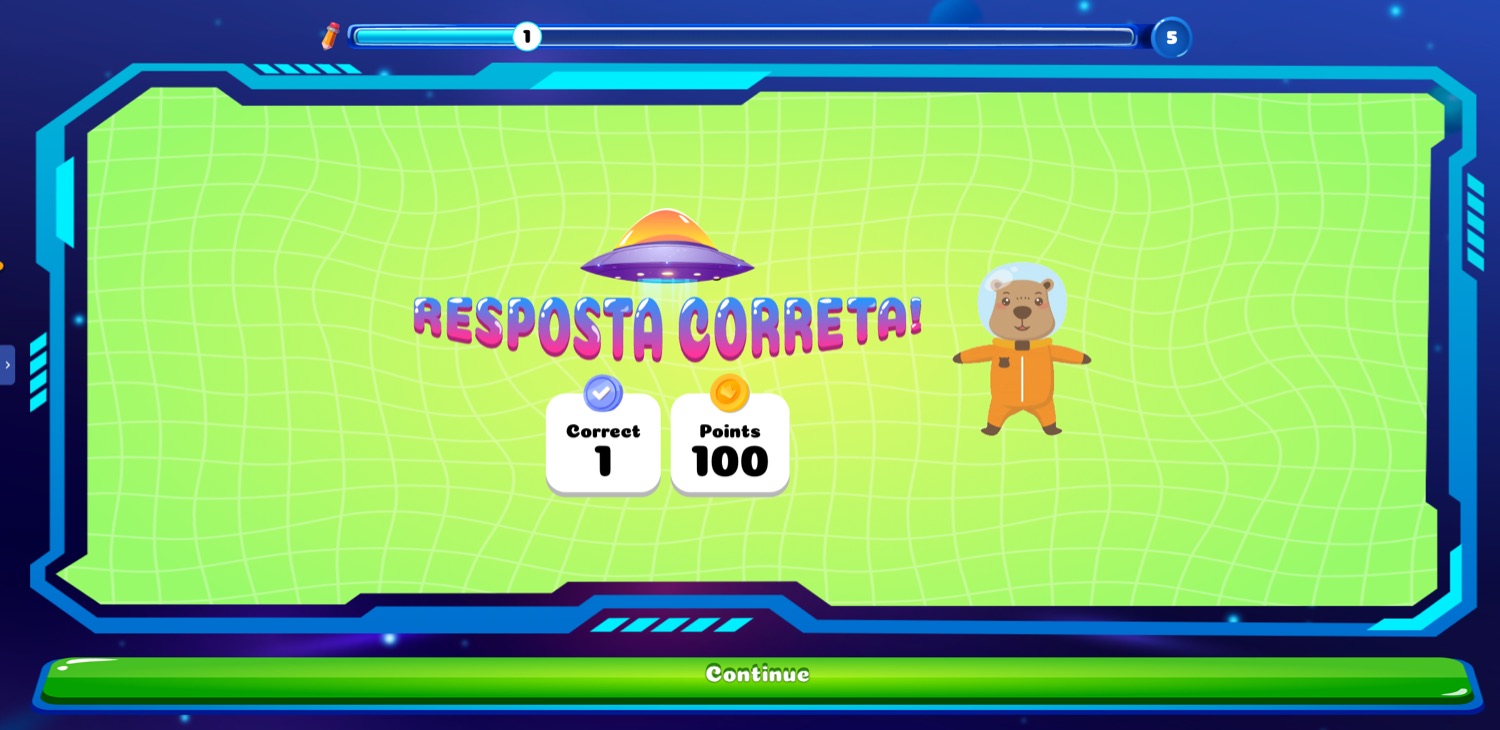
Feedback screen reading RESPOSTA CORRETA! with a correct counter of 1 and 100 points awarded, plus a Continue button.
5 · Immediate feedback

Right or wrong is settled on the spot, with points and ranking — and recorded per skill for the teacher.

  • Take part, not just watchThe student responds inside the teacher’s lesson, in real time, from their own device.
  • Answer quizzesFive items per round, lives, points and a class ranking — with right/wrong resolved immediately.
  • Write, not only tapOpen-ended answers to the board’s investigation and experiment prompts, returned with AI feedback and a level.

Both doors write to the same record.

Whatever the student touches — a live quiz on screen, a written investigation, or a printed answer sheet — lands in one achievement record per student, per skill.

On screen

Live quiz answers and board answers are captured as they happen: which student, which item, which curriculum skill, right or wrong — no separate marking step.

On paper (OMR)

Where a class works offline, the same items print as OMR answer sheets. The teacher scans them with a smartphone and the results enter the same record — so a school without a device per child is not excluded.

Back into the lesson

The dashboard groups the class by level and pushes corrective or advanced material to the students who need it — which is the point of collecting any of it.

The loop only pays off if it is actually closed in class. That is why the pilot measures use first — how many units are run, how many rounds are answered, how much material is pushed back — and scores second.

AI quiz generation

From raw material to a ready quiz — in one click.

Upload the source material and Aprendiz writes the assessment in the shape Paraná’s classrooms already work in — the Prova Paraná item format: a support text or dataset, a single command line, four alternatives. Every item carries its curriculum skill and its Bloom level, so a quiz is built to a cognitive profile rather than filled with recall questions.

Item 07 / 12 Ciências · 7º ano BNCC EF07CI03 Prova · 4 alternativas Bloom 4 · Analisar

Texto-base

A turma encheu três copos iguais com água a 80 °C. O copo A ficou aberto, o copo B recebeu uma tampa de plástico e o copo C recebeu tampa e uma manta de lã. A temperatura foi medida a cada 10 minutos.

Temperatura da água (°C) — registro da turma.
TempoA · abertoB · tampaC · tampa + lã
0 min808080
10 min626874
20 min515869

Comando

Aos 20 minutos, a água do copo C está 18 °C mais quente que a do copo A. Isso acontece porque a tampa e a manta:

  • Aaquecem a água, repondo o calor que ela perde para o ambiente.
  • Bbloqueiam a entrada do frio do ambiente para dentro do copo.
  • Cdificultam a saída de calor da água para o ambiente.
  • Dtransformam o calor da água em energia luminosa dentro do copo.
Gabarito comentado — what each wrong answer tells the teacher
  • A — the student treats the blanket as a source of heat. misconception: isolante-como-fonte
  • B — “cold” is treated as a substance that flows in, instead of heat flowing out. misconception: frio-como-entidade
  • D — heat is assumed to convert into another form of energy inside the cup. misconception: conversão-espúria

Each distractor is written against a documented misconception, so a wrong answer points to which idea to reteach — not just to a lost point.

Curriculum match (RAG) Answer-key check Teacher review before use Illustrative item · synthetic

The item shape it writes to

The structure Paraná’s state assessment uses — generated, not retyped.

  1. Texto-base — a short text, table, or figure the student has to read before answering.
  2. One command line — a single question, no double-barrelled asks, no “which alternative is incorrect” traps.
  3. Four alternatives — one key, three distractors, each written against a named misconception.
  4. Mapped — descriptor plus BNCC skill code on every item, so results roll up by skill instead of by score alone.

Bloom levels across a 12-item quiz

The teacher sets the profile; the generator fills it and reports back.

Bloom floor. Accessible versions of an item — easy-read, braille, screen-reader — may change the wording. They never lower the Bloom level, and never change the answer key.

1-click

Auto-generated, calendar-aligned

Quizzes created from your material and mapped to the school’s academic calendar — cutting lesson-prep time.

OMR

Paper or screen

Students answer on paper (OMR, no tablets needed) or on screen; teachers scan with a smartphone and the AI grades instantly.

Live

Game-quiz mode

A synchronous, Kahoot-style class game — designed so no student is left out (personal deadlines, opt-out ranking).

Checked before use

Generated items are validated against the curriculum (RAG) and reviewed by a teacher before students see them.

Trust & safety

An AI you can trust.

RAG

Curriculum-aligned accuracy

Unlike open-internet chatbots, it answers only from approved textbooks and verified materials. If it isn’t in the curriculum, the AI says so and points to the source rather than inventing.

Ethical guardrails

Inappropriate-content filtering and automatic masking of personally identifiable information protect student data.

Integrated system

A personalized 3-step learning cycle.

Aprendiz builds a digital twin of each student’s knowledge state.

Core content

Approved textbooks digitized into an interactive library.

AI tutor

A safe, curriculum-oriented conversational agent that guides inquiry.

Active learning

Analyzes performance and prescribes corrective content or advanced challenges — exactly when needed.

Science · inquiry & experiment

The part Paraná keeps pointing to: students actually doing science.

The science board does not stop at reading about a phenomenon. Two of its six tabs put the student in the lab — Experimento and Investigação — and both are built to the same rule: a hypothesis written before the result is known, a variable the student manipulates, and a conclusion the student has to argue. A single-step recipe does not qualify as inquiry and is rejected by the generator.

Experimento · 7º ano · EF07CI03

“Quem segura o calor?”

  • HipóteseBefore touching anything, the student records which cup will cool slowest — and why. The platform locks the answer before the data arrives.
  • VariávelOnly the covering changes: open cup, plastic lid, lid plus a wool wrap. Everything else is held equal.
  • MedirWater temperature at 0, 10 and 20 minutes, recorded in the student’s own table.
  • ArgumentarDo the numbers support the hypothesis? What would you change to test it again? The argument is the deliverable, not the temperature.
  • SegurançaHot tap water only — no flame, no boiling. Materials and precautions are part of the generated content.
Limite do modelo. The wool does not produce heat — it only slows the heat leaving the water. Every model and analogy on the board states where it stops resembling the real mechanism.

Investigação · 7º ano · EF07CI03

“Por que o cabo da panela é de plástico?”

  • PerguntaOne question that cannot be answered by copying a definition — it needs evidence the student assembles.
  • FontesSearch runs over approved material only (RAG). The board shows which page each fact came from; it does not browse the open internet.
  • OrganizarThe student sorts conductors and insulators, adding examples found at home, and has to justify each placement.
  • ProdutoA written, argued answer with its source cited — reviewable by the teacher alongside the experiment result.
On the lesson’s own skill. The activity has to exercise the unit’s primary descriptor, not a neighbouring topic that merely sounds related — an off-skill activity is sent back before a teacher ever sees it.

Science you have to see — rendered by AI.

Convection, cell division, a circuit under load: the phenomena a 7th-grader cannot watch in a classroom. Aprendiz generates the still image from the approved lesson material, animates it, and then checks the result against the lesson text before anyone sees it.

AI-rendered · illustration Convecção na água aquecida água quente sobe água fria desce Correntes de convecção · EF07CI03
Sample render — “Correntes de convecção”Generated from the unit’s approved slides, then animated. Rendered illustration, not laboratory footage — and labelled that way on the board.

Before a rendered frame reaches a student

Generation is the easy half. This is the other half.

  1. Rendered from approved material. The prompt is built from the unit’s own slides and textbook pages — not from a free-text description of the topic.
  2. Still first, then motion. A scientifically checked still image is produced, and only that image is animated — so the motion cannot introduce a phenomenon the still never showed.
  3. Frame ↔ text agreement check. An automated pass compares what the clip shows with what the lesson says, and the narration is transcribed and compared with the on-screen caption. Disagreement blocks publication.
  4. No false analogies. A model that behaves the opposite way to the real mechanism is rejected outright; any analogy that survives has to state its limit on screen.
  5. Teacher and subject specialist sign off. A science teacher approves the clip before it is attached to the lesson — the same gate every generated item passes.

Interactive simulations · in development

Experiments a student can run — not just watch.

Alongside the rendered clips, Aprendiz is building manipulable simulations: change a variable, watch the system respond, form the conclusion yourself. The pedagogical foundation is PhET, the interactive-simulation project of the University of Colorado Boulder. We build our own activities on that foundation rather than embedding third-party simulations, so every one of them can be tied to the Brazilian curriculum and carry our accessibility contract from the first line of code.

The foundation

PhET Interactive Simulations

Browser-based simulations for physics, chemistry, biology, earth science and mathematics — HTML5, so a student manipulates them directly in a browser with nothing to install. Used in classrooms worldwide for both live demonstration and remote practical work, and studied by university researchers as a testbed for online science-teaching effectiveness.

Founded
2002, University of Colorado Boulder
Founder
Carl Wieman — Nobel Prize in Physics, 2001
Subjects
Physics · chemistry · biology · earth science · maths
Technology
HTML5, runs in any browser

phet.colorado.edu ↗

What is built so far

Not one-off simulations — reusable activity types. Build the type once, and every activity of that shape is covered.

46 / 61science activities covered by the three live types

A sixth type, Órbita e fases, was added for the early years (movements of the Earth and Moon) and sits outside this classification.

Running today in the internal build

Portuguese-first, curriculum-numbered by unit and activity.

Por que a Lua muda de forma?
5º ano · Unidade 9001 · órbita e fases
Ligue as estrelas: as constelações
5º ano · Unidade 9002 · construir relações
Dissecando flores
7º ano · Unidade 416 · estrutura e partes
Germinação: o que muda com umidade e temperatura?
7º ano · Unidade 430 · comparar condições

Accessibility is in the shell, not bolted on. The simulation container itself carries the school-year, colour-scheme, text-scale, low-stimulus and reduced-motion settings — the same four axes as the rest of the platform — so an adapted simulation is the same simulation, not a separate one.

Status: in development, and labelled that way. The simulation library is a current work item, not a shipped feature — activity content is team-authored and awaiting subject-specialist validation, and the two remaining activity types are still being built. PhET is an independent project of the University of Colorado Boulder; Aprendiz is not affiliated with or endorsed by it.

Case study · Brazil

Empowering teachers to focus on teaching.

−50% prep time

AI-generated lesson plans from raw material; quizzes tied to the academic calendar in one click.

Digital analysis, analog classroom

Students answer on paper (OMR) — no individual tablets. Teachers scan with a smartphone; the AI grades and updates the dashboard instantly.

Actionable insight

Dashboards show individual and class progress; automatic grouping by level (High / Medium / Support).

Adaptive content

Supplementary materials pushed automatically based on the specific difficulties detected.

Accessibility & Inclusion

Built for every learner — including students with disabilities.

One common activity for the whole class — never separate tracks. Support is turned on by need, not by a diagnosis label, and every AI-generated adaptation is reviewed by a teacher and a subject specialist before a student sees it. The science, the concepts, and the answer keys never change.

A 4-axis settings assistant

LanguageEasy-read ↔ standard — lowers reading load, keeps the science.
Visual densityCalmer or richer layouts; larger type and spacing.
StimulusLow-stimulus mode: reduced motion, no surprise auto-advance.
InputSwitch, keyboard, or pointer — the student’s way in.

Always on for everyone — cannot be turned off by any setting:

CaptionsSign-language availabilityExtra timeClear focusSemantic structure

Design targets: WCAG 2.2 AA · eMAG · LBI 13.146 · LGPD · LIBRAS (Lei 10.436) · BNCC · UDL. Accessibility is built into the content itself — not a bolt-on overlay.

One lesson, many ways to learn.

The same board — “Ecological Relations” — rendered for different learners: the standard view, and the very same content adapted for a low-vision student with easy-read.

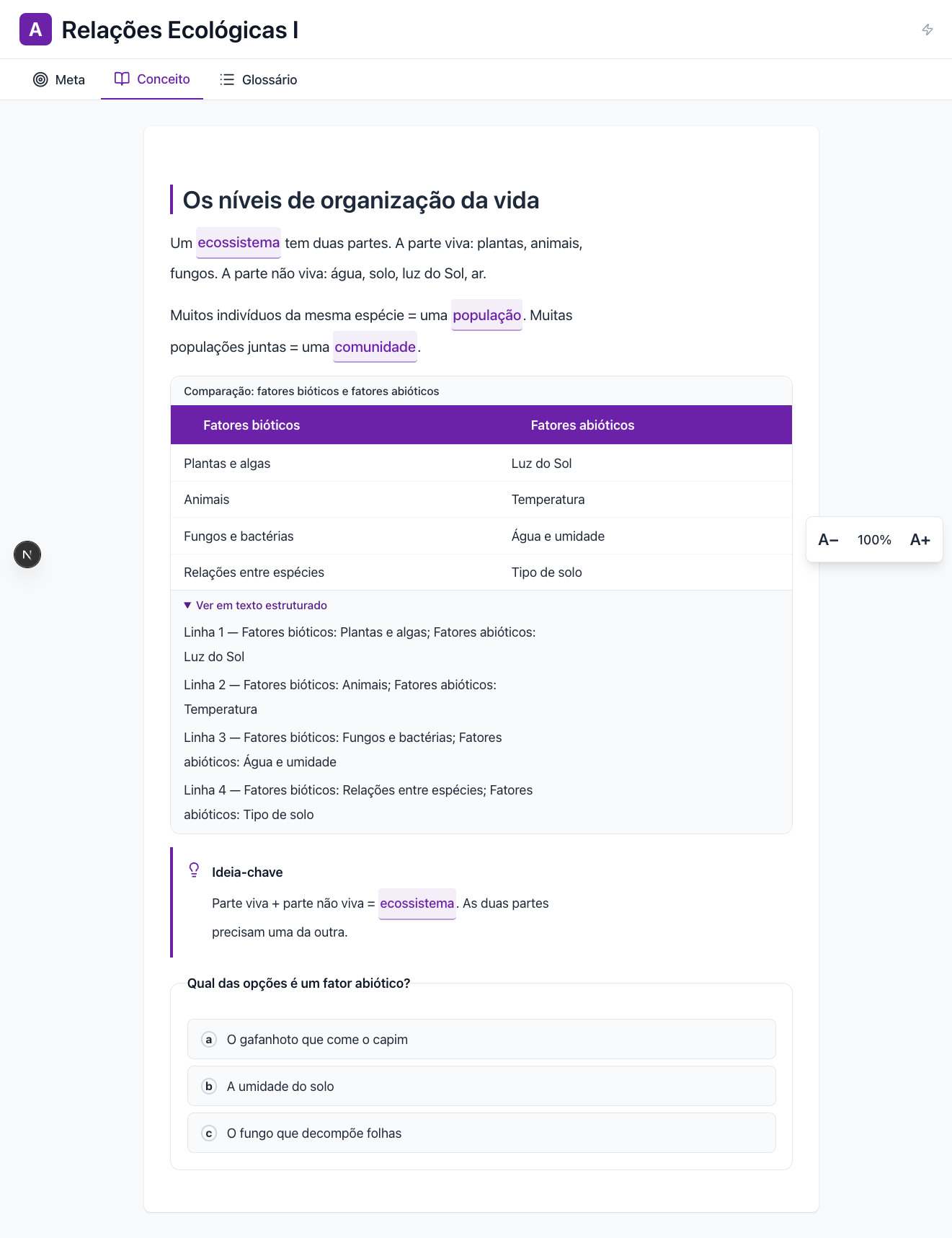
Standard AI learning board for the lesson Relações Ecológicas I, in Portuguese.
Standard

The default board — concept text, key-term glossary links, and a biotic/abiotic comparison table.

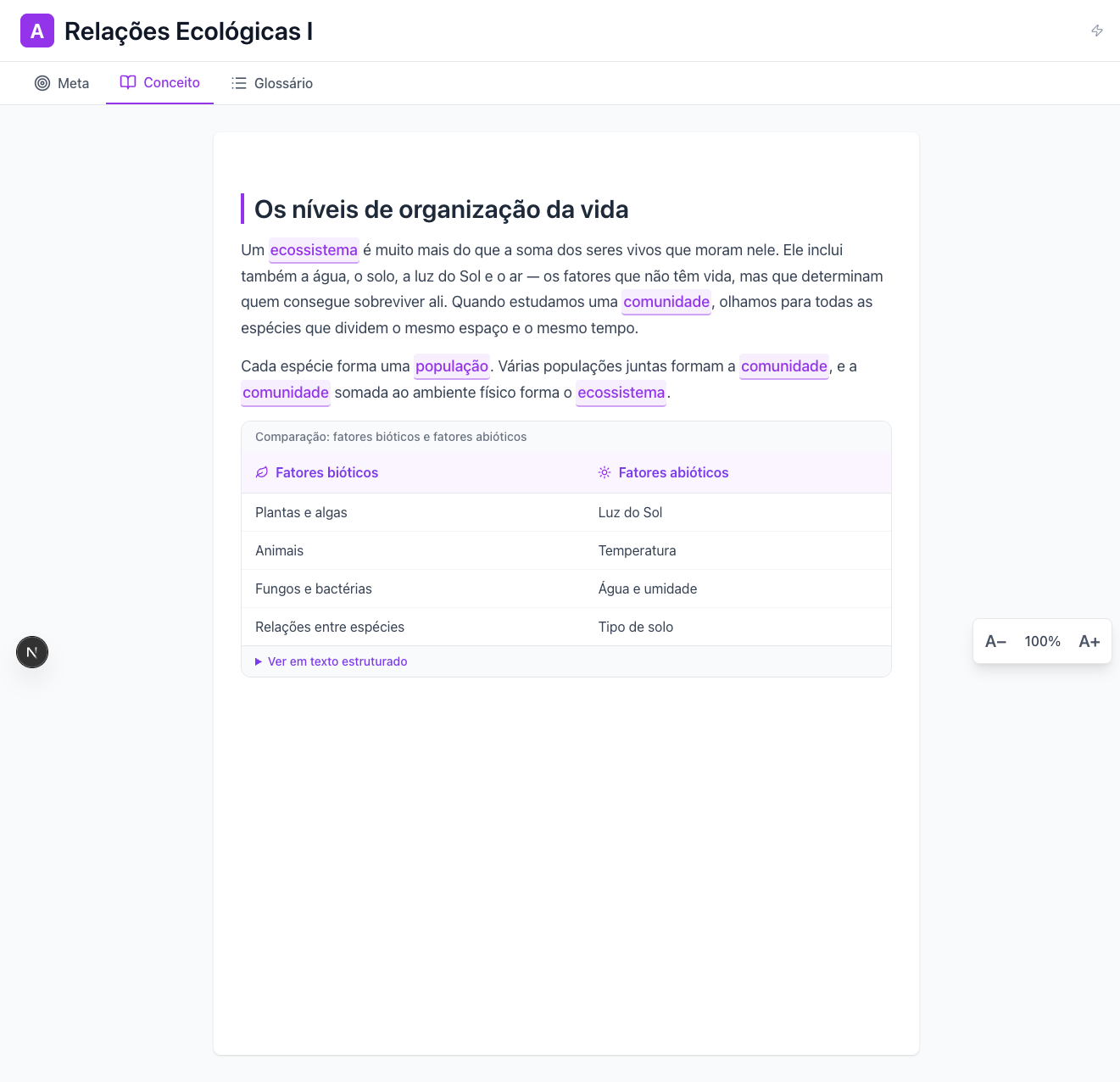
The same lesson adapted: larger type, wider spacing, easy-read sentences, a structured-text version of the table, and a key-idea box.
Low-vision + easy-read

Same lesson, adapted: larger type & spacing, easy-read sentences, a screen-reader-friendly structured version of the table, and a key-idea summary.

Blind / low-vision

In collaboration with DOT Inc., lessons render as braille and tactile graphics on the DOT Pad — with a device-independent braille download (BRF) so no student is ever blocked when a device isn’t available. Low-vision: 200–400% zoom and reflow.

Deaf / hard-of-hearing

Sign-language-first (LIBRAS), with human-interpreted video for core science terms; captions are always on and every sound cue has a visual equivalent. (Deaf ≠ intellectual disability — written-Portuguese support is handled separately.)

Intellectual disability

Easy-read lowers the reading load while concepts and answer keys stay the same; key vocabulary is picture-supported; one question at a time, with concrete feedback and a no-penalty retry.

Autism / ADHD

A calm low-stimulus default: reduced motion, no gamified flourishes, no surprise auto-advance, and a steady hint cadence.

Motor / physical

Keyboard and switch access, large touch targets, no time pressure, and drag-free alternatives for every interaction.

Deafblindness / multiple

A braille text stream plus multimodal safety notes — so a single channel is never the only channel.

Design-confirmed and rolling out. Some capabilities — such as real-time DOT Pad tactile output and Brazilian-LIBRAS content — are being deployed with device-independent and human-reviewed fallbacks. AI-generated easy-read and sign-language material is checked by teachers and specialists before students see it. WCAG 2.2 AA is our design target, not a blanket compliance guarantee.