Aprendiz Inteligente · Grade 5 pilot
One science lesson. Several ways in. A pilot with CELEPAR, September 2026.
Aprendiz Inteligente already runs 7th- and 8th-grade science in Paraná public schools, on a platform supplied under CELEPAR — the state's approved public-tender ICT company. This pilot is designed to extend that same curriculum-locked Lousa IA (AI board) and quiz generation to 5th grade, pending a separate technical approval — the aim is one lesson reachable through several access paths, with the teacher keeping the final call.
Teacher and student use different environments, but activities and results stay linked to the same learning path — per student, and per skill.
Where this pilot starts from
An installed base, not a cold start.
Aprendiz Inteligente is already in daily use in Paraná. The two numbers below are kept separate on purpose — one is what is running today, the other is an institutional target for next year.
Current student base
Students already using Aprendiz Inteligente in Paraná public schools today.
2026 expectation
Institutional projection for 2026 — a target, not a count of current users.
Grade coverage
5th, 7th, and 8th grade science at different rollout stages — 7th and 8th already running, 5th the step this pilot adds — aligned to BNCC and the school's academic calendar.
Inclusion, met inside the supply agreement you already have.
Brazilian law requires that students with disabilities be enrolled in regular classrooms alongside their peers — not in a separate track. LBI 13.146/2015, Decreto 7.611/2011, and the national special-education policy (Decreto 10.502/2020) make inclusive education in mainstream schools a legal duty for every education department, not an optional add-on.
One product, not a separate purchase
Accessibility settings live inside the same curriculum board a secretaria already licenses — there is no separate accessibility product, vendor, or budget line to manage.
Already inside an approved supply path
Aprendiz Inteligente is delivered under CELEPAR's existing public-tender-approved supply. Extending it to grade 5 — or turning on its accessibility settings — is expanding an asset already in place, not opening a new tender.
What's already verified, and what's still ahead.
The claim behind "one product, not a separate purchase" is that grade 5 will reuse the same engine already running 7th- and 8th-grade science — not a parallel build made for this pilot. Two lists, so a reviewer can check each part separately.
Already verified today
The shared engine is real and live. The same lesson format, Lousa IA, and quiz-generation engine already running 7th- and 8th-grade science in Paraná has been in daily classroom use since May 2026 — this is the platform grade 5 is planned to extend, not a new system built for this pilot.
The accessibility settings are the platform's, not a demo-only layer. The four-axis settings assistant further down this page (Accessibility & Inclusion ↓) is the same mechanism already shipped on the current platform.
The board screenshot above is a genuine capture, not a mockup — taken from the live 7th-grade production build, the same board grade 5 is planned to run on.
In progress, pending approval
Grade-5 wiring does not exist yet. No grade-5 configuration has been added to the platform's codebase — extending the shared engine to grade 5 is planned work, not a change already made.
That extension needs its own sign-off. Connecting grade 5 to the production engine is a separate technical scope with its own approval step, kept apart from this pilot's content and design work so the current 7th/8th-grade service is never put at risk.
Content coverage is partial, as already stated below. 46 of 61 planned grade-5 science activities are built; the remainder, plus subject-specialist validation, are still in progress (see "Status: in development" under Science).
The same inquiry method the platform already runs — a hypothesis before the result.
Two of Lousa IA's tabs put the student in an investigative posture — Investigação and Vivência. The rule is the same in both: a hypothesis written before the result, one variable the student manipulates, and a conclusion the student has to argue for. Activities prioritize investigation, observation, and building conclusions, over merely mechanical steps.
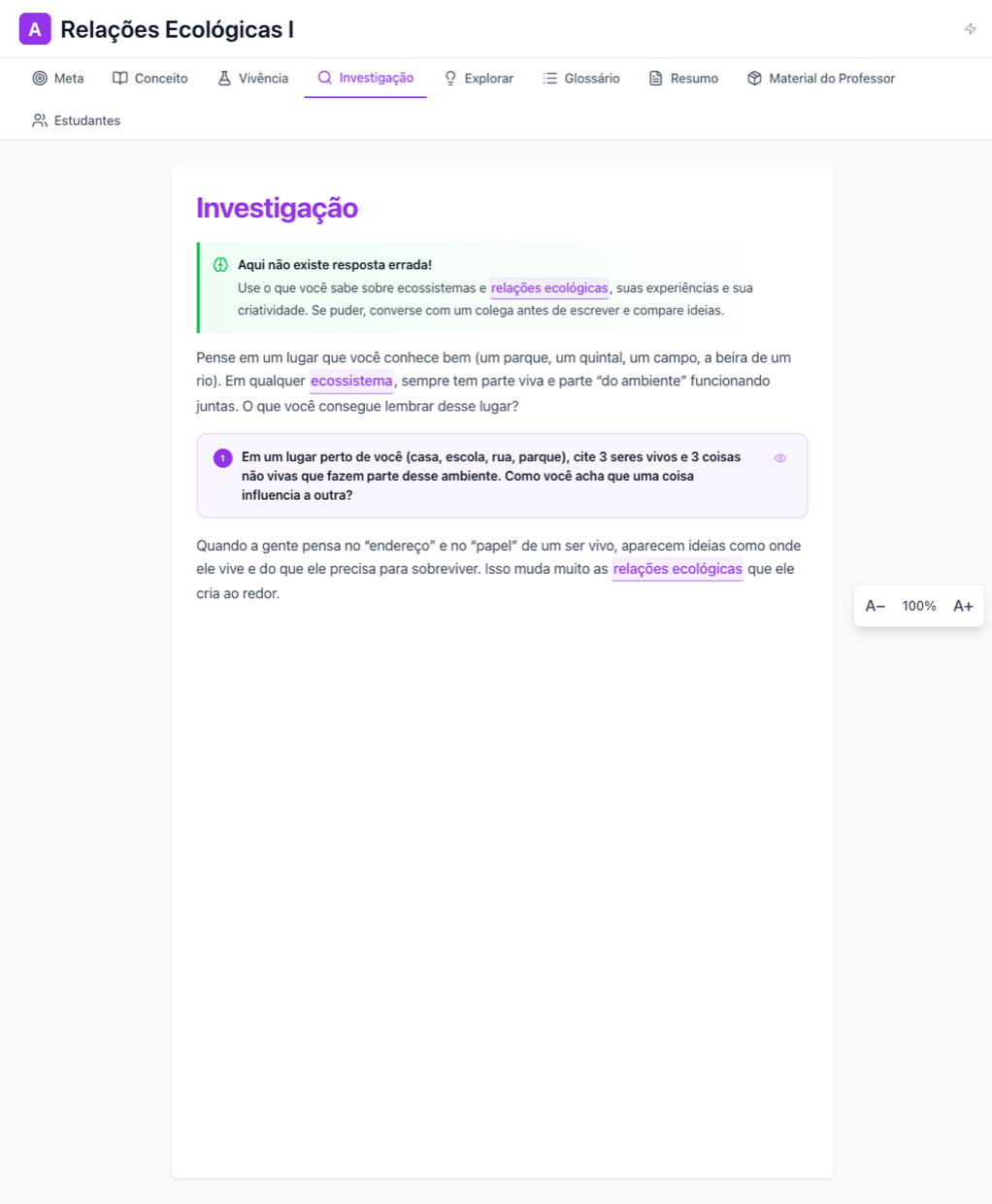
The inquiry-tab shape this pilot plans to reuse for 5th grade — shown here on the platform's live 7th-grade build, the version actually running today.
Hypothesis → variable → observation → argument
The platform locks the student's hypothesis before results arrive, so the prediction comes first.
BNCC-mapped, Bloom-leveled
Every item carries its curriculum skill code and cognitive level, and the pedagogical foundation for interactive activities is PhET (University of Colorado Boulder).
Interactive prototype · in development
Walk through the 5th-grade student flow.
A click-through prototype of the whole lesson flow — the teacher opening the session, then the student's sign-in lobby, unit selection, waiting room, and the in-game Lousa IA. It runs in the browser, no login required.
Aprendiz Inteligente for 5th-grade science — a guided overview
5th-grade adaptive mission deck — click-through walkthrough
Answers change the path: a wrong answer opens a reinforcement track with extra support, and a clean run opens a deeper one. The lesson content used for the walkthrough is a sample drawn from the team's internal development guide, not one of the approved September lesson units, and the teacher session panel is a proposed view shown as a simulation. The flow and screens illustrate the direction of the product, not the final in-class experience.
Accessibility settings panel — interactive prototype
An accessibility panel built by UFIT over the team's broader activity library (35 experiences across 5th, 7th, and 8th grade). This is a wireframe-stage prototype, not the shipped build: the settings themselves run live in the browser — language, visuals, voice, and Libras — while the activity around them illustrates the direction rather than the finished experience. The Libras option is UFIT's integration of VLibras, the Brazilian government's official sign-language avatar; switching Libras on opens the avatar in a reserved column beside the lesson, so it never covers the text, and the avatar signs interface labels only. Sign language for lesson content is planned as human interpretation with Deaf review — an automatic avatar supports the interface and does not replace it. Voice read-aloud prefers the browser's own text-to-speech; a secondary voice service is not reachable from outside the internal network, so narration quality may vary here.
One lesson, several ways in — never a separate track.
The same four-axis settings assistant used across the platform: language, visual density, stimulus, and input. Support is turned on by need, not a diagnosis label, and set by the teacher and pedagogical team — informed by each student's PEI where one exists.
Always on for everyone — cannot be turned off by any setting:
Where a class doesn't have one device per student, the same items can be printed. The teacher scans the answer sheet with a smartphone, and the result is recorded in the system.
Design targets: WCAG 2.2 AA · eMAG · LBI 13.146 · LGPD · LIBRAS (Lei 10.436) · BNCC · UDL. These are design references, not a certification of full compliance. Full accessibility detail on the Aprendiz Inteligente page →
From demonstration to pilot
Four steps, and the teacher keeps the decision.
Align
Curriculum unit, access needs, and the pilot's data terms are agreed with the network before anything starts.
Configure
The lesson is set up for the class, with a printed-answer-sheet fallback where devices are limited.
Observe
The pilot measures use first — units run, rounds answered, material pushed back — before it measures scores.
Decide
A closed pilot with a clear no-go is a legitimate outcome. The teacher keeps the final pedagogical call throughout.
Next step
Bring this pilot to your network.
Partner schools and education authorities can request the full pilot resource pack — manuals, POC proposal deck, sample report, and the evidence brief.